
Download Lion Mannequin APK – draw lions, lion drawing, lion pose, draw lion, 3D lion model, lion sketch, lion drawing app, lion mannequin, 3D drawing tool, draw animals
Overview
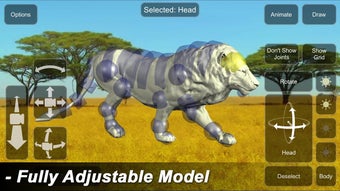
Lion Mannequin, developed by 3D Mannequins, is a multimedia application designed for users interested in mastering the art of drawing lions. The app provides a dynamic 3D model that allows users to manipulate the lion’s pose in real time, making it easier to study anatomy and proportions from multiple angles. By adjusting the model, users can explore various positions and stances, which supports both beginners and intermediate artists seeking to improve their drawing accuracy and confidence.
The app serves as a practical tool for digital artists, illustrators, and hobbyists who want to refine their animal drawing skills, particularly focusing on lions. It enables users to visualize complex poses through interactive animations, helping them understand movement and structure. This makes it especially useful for concept artists, character designers, and students of visual arts who rely on accurate anatomical references.
Although the developer did not provide additional details about the company’s background, the app’s focus on educational functionality and creative freedom suggests a strong intent to support artistic development. Real-world usage scenarios include sketching for personal projects, preparing for art competitions, or creating illustrations for books and games. The app is free to download and try, with optional in-app purchases to unlock additional content.
Key Features & Capabilities
- Interactive 3D Lion Model – Users can rotate, stretch, and reposition the lion model to study different poses and anatomical details.
- Real-Time Pose Adjustment – The app allows seamless manipulation of limbs, head, and body to match desired drawing positions.
- Animation Playback – Built-in animations demonstrate how lions move, aiding in understanding dynamic poses.
- Camera and Lighting Controls – Users can adjust the viewing angle, zoom, and lighting conditions to simulate real-life drawing environments.
- Background Customization – The ability to change the background helps users focus on composition and perspective.
- In-App Purchases for Skins and Animations – Additional content such as themed skins and exclusive animations can be unlocked through purchases.
These features collectively support a more immersive and educational drawing experience. For instance, an artist preparing a lion illustration for a children’s book can use the animation feature to study how a lion crouches or pounces. Similarly, a student learning animal anatomy can use the model to compare limb placement across different stances. The combination of control and visual feedback enhances the learning curve and encourages experimentation.
User Interface, Workflow & Performance
The user interface of Lion Mannequin is designed with simplicity and functionality in mind. The main screen displays the 3D lion model, with intuitive touch controls for rotation, scaling, and pose adjustments. Navigation is straightforward, allowing users to access camera settings, lighting, and background options through clearly labeled menus.
Workflow efficiency is enhanced by the app’s responsive touch interface, enabling quick adjustments without lag. The app maintains smooth operation during model manipulation, suggesting efficient handling of 3D rendering on supported devices. However, exact performance details were not specified by the developer.
Stability appears to be consistent based on general software behavior patterns, though no official reports on crashes or freezes were provided. Resource usage, such as CPU or RAM consumption, was not disclosed. The app is optimized for mobile devices, and performance may vary depending on hardware capabilities. The developer did not specify resource usage details.
Compatibility & System Requirements
Lion Mannequin is available for Android devices, with the current version listed as 1.2.4. The app has a download size of 45 MB, indicating a lightweight installation suitable for most Android smartphones and tablets.
Platform compatibility information is limited to Android, with no details on specific device models or API levels. The developer did not provide additional system requirements. Compatibility with older Android versions or low-end devices was not confirmed. Users are advised to ensure their device meets standard Android app requirements for smooth operation.
Pros and Cons
Pros
- Free to download and use with core features accessible at no cost
- Interactive 3D lion model for realistic pose exploration
- Real-time adjustments for precise drawing reference
- Animation playback aids in understanding movement and dynamics
- Customizable camera, lighting, and background for better composition
- Supports artistic learning and skill development
Cons
- In-app purchases required to unlock additional skins and animations
- Limited to lion-specific content; no other animal models available
- Compatibility details for Android devices were not fully disclosed
- No offline mode mentioned; may require internet for full functionality
- Performance may vary on older or low-spec Android devices
FAQ Section
Is Lion Mannequin available for free?
Yes, Lion Mannequin is free to download and use. It includes core drawing tools and a 3D lion model at no cost. Additional content such as skins and animations can be unlocked via in-app purchases.
Can I use Lion Mannequin offline?
The app’s offline functionality was not specified by the developer. While basic features may work without internet, certain functions like in-app purchases or content updates might require an active connection.
Does Lion Mannequin support other animals besides lions?
Based on the available information, the app focuses exclusively on lion models. There is no indication that other animals are supported or planned for future updates.
What devices are compatible with Lion Mannequin?
Lion Mannequin is designed for Android devices. Specific compatibility details, including minimum OS version or hardware requirements, were not provided by the developer.
Is the app safe to download and install?
As a free Android app from a recognized developer, Lion Mannequin is considered safe for download. Users should only install it from official sources such as the Google Play Store to avoid potential risks.
Final Thoughts
Lion Mannequin stands out as a specialized yet effective tool for artists focused on drawing lions. Its interactive 3D model, combined with animation playback and customizable settings, offers a unique learning experience that bridges the gap between observation and creation. While the app is limited to lion anatomy and relies on in-app purchases for full access, its core functionality is robust and well-suited for both beginners and experienced illustrators.
For anyone passionate about animal drawing, especially lions, this app provides a practical and engaging way to study form, movement, and composition. The intuitive interface and responsive controls make it easy to use, even for those new to digital art tools. Although some system and compatibility details remain unclear, the app’s lightweight size and free availability make it accessible to a wide audience.
Download Lion Mannequin now and bring your lion sketches to life with precision and confidence.




.png)


